Article
Swift 6 Concurrency — Zero to Hero
A complete, opinionated guide to writing concurrent Swift 6 code that the compiler can prove is data-race free. Built around one running example — a small image-download pipeline — and ending in a hands-on lab that ships a production-grade version of it.

- Published on
A note before section 1
PixelPump — a tiny command-line image-pipeline app. It reads a list of image URLs, downloads each image, resizes it, writes the output to disk, and updates a counter of completed downloads. PixelPump is the smallest example big enough to need bounded concurrency, retries, timeouts, cancellation, an actor for the shared counter, and @MainActor for a tiny progress display. We'll return to PixelPump in every section so the structure grows alongside the ideas. The Hands-On Lab in § 21 builds it production-grade, end to end.
1. The Mental Model
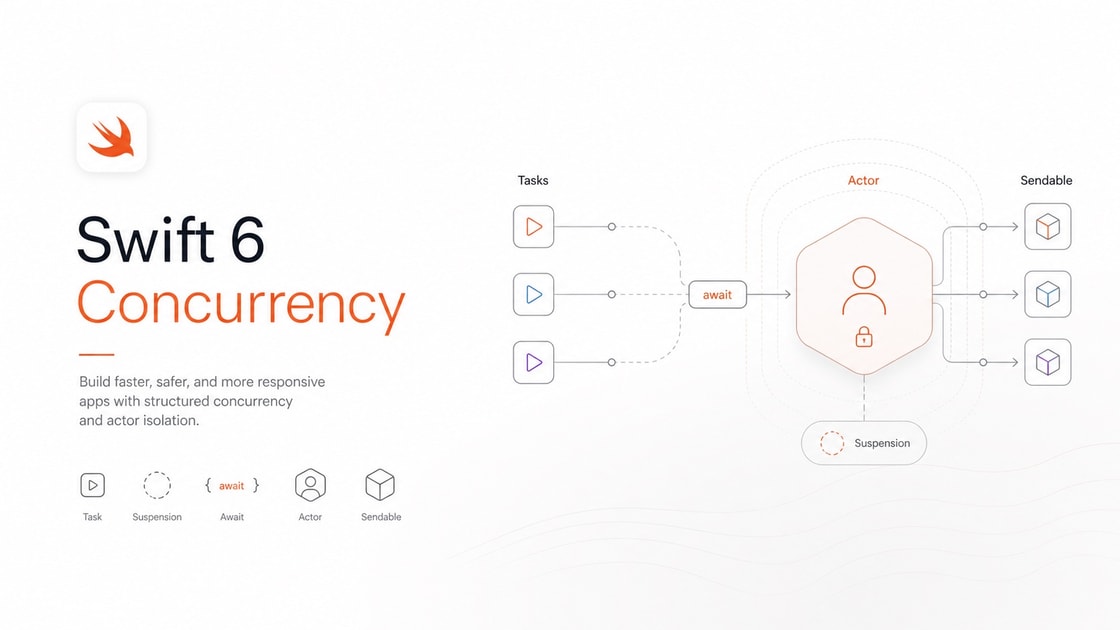
Swift Concurrency solves one problem: doing many things at the same time without corrupting shared data. Every feature in the language — async, await, Task, actor, Sendable, @MainActor — serves that one goal.
Three load-bearing ideas carry the rest of this tutorial.
- Async functions are functions that can pause. Not threads. A suspension point (a place inside an async function where it can pause and let the runtime do other work) is just
await. The thread is free during the pause. - Isolation domains are regions of memory only one task can touch at a time. Each
actoris a domain.@MainActoris one shared domain. The compiler proves you do not accidentally share data across them. Sendableis the property the compiler checks at every domain boundary. "Can this value safely cross?" If yes, it crosses. If not, the compiler stops you.
That is the whole model. Tasks, TaskGroups, sending, region-based isolation, every pattern in § 16 — all serve those three ideas.
Think of it like… a busy bakery. Many orders happen at once (concurrency). Each baker works alone at their station; the trays they pass to other bakers are clearly labelled (isolation + Sendable). When a baker waits for the oven, they hand the station to another baker (suspension).
In software, this looks like… PixelPump runs eight downloads at once. Each download is its own task. The shared
countis owned by aDownloadCounteractor. The progress label is on@MainActor. URLs and final byte counts cross between domains — they areSendable. The image buffers stay inside the worker that produced them.
"Async functions pause; actors serialise; Sendable crosses. Three ideas, the rest is wiring."
2. Why Concurrency Even Exists
Concurrency vs parallelism
Concurrency (structuring work so it can run in any order) is about design. Parallelism (work running literally at the same time on different cores) is about execution. A single-core phone can run highly concurrent code; only a multi-core machine runs it in parallel.
Think of it like… a chef writing a recipe so steps can interleave (concurrency). Whether two cooks actually do them at once (parallelism) is a separate question.
In software, this looks like… PixelPump's downloads are concurrent. On an 8-core laptop, eight of them run truly in parallel. On a one-core CI runner, the same code still works — they just take turns.
Don't confuse with… Concurrency is the structure (could overlap). Parallelism is the execution (definitely overlapping). Swift 6 helps you write correct concurrent code, whether or not it ends up parallel.
What a data race actually corrupts
A data race (two tasks accessing the same memory at the same time, at least one writing, with no synchronisation) corrupts whatever they touch — a counter loses updates, a string ends up half-written, a class instance ends up in an impossible state.
// ❌ Will not compile under Swift 6 — data race on `count`
final class Counter { var count = 0 }
let c = Counter()
Task { for _ in 0..<10_000 { c.count += 1 } }
Task { for _ in 0..<10_000 { c.count += 1 } }
Two tasks read count, both add one, both write back. One update is lost every time their reads overlap. The end value is always under 20,000.
The Swift 5 fix was a lock. The Swift 6 fix is an actor — same idea, ergonomic, and the compiler proves correctness.
Don't confuse with… A data race is unsynchronised memory access (compiler-checkable). A race condition is a higher-level wrong-answer due to ordering (often a logic bug; compiler cannot catch it). Reentrancy bugs (covered in the companion article) are race conditions, not data races.
Why locks are correct but unergonomic
You can lock a Counter. You must remember to lock everywhere it is touched. You must avoid taking two locks in different orders (deadlock). You must release on every error path. Most teams get one of these wrong eventually.
actor makes the safe path the default path.
Compile-time vs runtime safety
The Swift 6 compiler proves a wide class of races cannot happen before you ship. Thread Sanitizer (TSan) (a runtime tool that detects data races as they occur) still catches the rest (the @unchecked Sendable cases, native modules, and some deinit edge cases). Compile-time + runtime is the full belt-and-braces story.
Now mediated by an actor:
Real situation: PixelPump's first version had
class DownloadCounter. The integration test downloaded 100 URLs and assertedcounter.count == 100. It failed once a week. Switchingclasstoactordropped the flake to zero.
3. async and await — The Core Primitive
Declaring an async function
An async function (a function that can pause without blocking a thread) is declared with async after the parameter list.
func download(url: URL) async throws -> Data {
    let (data, _) = try await URLSession.shared.data(from: url)
    return data
}
try await calls a function that may both throw and pause. The two keywords compose freely.
Think of it like… a coffee order. You hand it to the barista (await). You can sit and read while they pull the shot (the thread is freed). When it is ready, you carry on with your day (resume).
In software, this looks like… PixelPump's
download(url:)callsURLSession. The thread that runs it is not stuck waiting for the network — it can serve other tasks until the bytes arrive.
What await actually does
await is a suspension point, not a blocking wait. The runtime saves the function's local state, releases the thread, and resumes when the awaited operation finishes — possibly on a different thread.
Errors and async
async throws plus try await gives you the same error handling as normal Swift, no special syntax for "async errors."
Where you can call async functions
Async functions can call each other freely. Sync functions cannot call async without bridging. We unpack that bridge in § 4.
Don't confuse with… Suspension is "I will resume here later, the thread is free." Blocking is "the thread sits idle until I am ready." Swift Concurrency uses suspension. Old GCD-style waits used blocking. Suspension scales with cores; blocking does not.
- Use it when any function makes a network call, reads a file, queries a database, or waits on a timer.
- Skip it when the work is purely CPU-bound and short — overhead beats the win.
- You pay the "function colour" rule: async functions can call sync; sync cannot call async without a
Task.
Common tools:
async,await,try await(language);URLSession.data(network);Task.sleep(timer).
4. Task — Starting Async Work from Sync Code
A Task (an unstructured unit of async work that you start from outside an async context) is the bridge. Sync code cannot await, so it starts a Task.
// Inside a button handler (sync context)
Task {
    let data = try await download(url: u)
    print("got \(data.count) bytes")
}
Think of it like… a sticky note you hand to an assistant. You go back to your meeting (sync). They run the errand (async). You may or may not check what they did.
In software, this looks like… PixelPump's
mainis sync. To start the pipeline, it creates oneTaskthat awaits the whole structured tree.
Task vs Task.detached
Task { ... } inherits the caller's actor isolation, priority, and task-locals. Task.detached { ... } does not — it starts in the global pool with no inherited context. Detached escapes everything, which is rarely what you want.
Don't confuse with…
Taskinherits its enclosing context (the same actor, same priority).Task.detachedstarts fresh — no inherited actor, no priority, no task-locals.
The most common mistake
Wrapping every call site in Task { await ... } because "I just need to call an async thing here." If the calling function can be async, mark it async. The right answer is fewer Tasks, not more.
// ❌ Anti-pattern
func handleTap() {
    Task { await viewModel.refresh() }
}

// ✅ Better: make the caller async, push the Task to the boundary
@MainActor func handleTap() async {
    await viewModel.refresh()
}
- Use it when you genuinely cannot make the caller async (a
main, a delegate method withoutasync, a UIKit/AppKit handler that hasn't been migrated). - Skip it when the caller can be async itself.
- You pay an unstructured task — its lifetime is no longer tied to a parent.
Real situation: PixelPump's CLI entry point uses one
Task { ... }to start the whole pipeline. Every other async call lives inside that tree. One Task at the boundary, structured concurrency below.
Common tools:
Task(unstructured async work),Task.detached(escapes parent context),asyncmain(no Task needed).
5. Structured Concurrency — async let and TaskGroup
This is the section where the mental model shifts from "spawning threads" to "structuring child work." Lean into it.
async let — known small N parallel
func loadHomeScreen() async throws -> HomeScreen {
    async let posts = fetchPosts()
    async let profile = fetchProfile()
    async let badge = fetchBadge()
    return try await HomeScreen(posts: posts, profile: profile, badge: badge)
}
Three calls run in parallel. The await collects their results. If one throws, the siblings are cancelled automatically.
Think of it like… you order three dishes at once. They cook in parallel. You wait until all are ready before sitting down to eat. If the kitchen drops one dish, the others can be cancelled if you say so.
TaskGroup — unknown N or streaming results
func downloadAll(urls: [URL]) async throws -> [Data] {
    try await withThrowingTaskGroup(of: Data.self) { group in
        for url in urls { group.addTask { try await download(url: url) } }
        var out: [Data] = []
        for try await data in group { out.append(data) }
        return out
    }
}
A TaskGroup (a structured group that holds a dynamic number of child tasks) is the right tool when you don't know the count up front, or you want to consume results as they finish.
DiscardingTaskGroup (Swift 5.9+) is for fire-and-forget structured workloads — you only care that they finish, not what they return.
Don't confuse with…
async letis for known small N (2–5 child tasks, all named).TaskGroupis for dynamic N or when you want to read results as they complete.
Why structured is the default
Child tasks cannot outlive their parent. The compiler enforces it. No leaks. No "I forgot to cancel that thing." Structured concurrency is the default; reach for unstructured Task only at the sync-to-async boundary.
| Shape | Use when | Result type | Cancel |
|---|---|---|---|
async let | known small N | named locals | sibling cancel on throw |
TaskGroup | dynamic N or streaming | iterate the group | parent cancel cascades |
Unstructured Task | sync→async boundary | Task reference | manual cancel |
Real situation: PixelPump's downloader uses
withThrowingTaskGroupplus a slot counter to keep at most 8 downloads in flight (the bounded-concurrency pattern from § 16).
- Use it when you have multiple async operations whose lifetimes are tied to a parent.
- Skip it when you genuinely need work to outlive the caller (rare; document it).
- You pay the small ceremony of
withTaskGroup.
Common tools:
async let(structured child task),TaskGroup(dynamic structured group),ThrowingTaskGroup(can throw),DiscardingTaskGroup(fire-and-forget).
6. Cancellation — Cooperative, Not Forced
Cancellation in Swift is cooperative. Task.cancel() sets a flag and propagates it to children. The task itself must check.
Checking cancellation
func resizeAll(images: [Data]) async throws -> [Data] {
    var out: [Data] = []
    for img in images {
        try Task.checkCancellation()
        out.append(try resize(img))
    }
    return out
}
Task.checkCancellation() throws if cancelled. Task.isCancelled returns a Bool if you want to clean up first.
Suspension points are often cancellation points
Many system APIs (URLSession, Task.sleep, FileHandle async) check cancellation at their own suspension points. Custom code does not, unless you put checkCancellation() in there.
Registering cleanup
withTaskCancellationHandler lets you run code immediately when cancellation arrives — useful when you wrap a callback API.
Don't confuse with… Cooperative cancellation asks; the task chooses. Forced cancellation (e.g., killing a thread) does not exist in Swift Concurrency. You always need a checkpoint.
Real situation: PixelPump catches
SIGINT. The signal handler callstopTask.cancel(). TheTaskGrouppropagates the flag. Each download checks at the top of its retry loop and exits cleanly. No half-written files.
- Use it when any custom long loop runs inside a Task.
- Skip it when the loop is bounded and short.
- You pay one extra line per inner loop.
Common tools:
Task.cancel()(propagates to children),Task.checkCancellation()(throws if cancelled),Task.isCancelled(boolean),withTaskCancellationHandler(register cleanup).
7. Bridging Callback APIs — Continuations
For when you have to integrate with an old API that still uses completion handlers.
func legacyDownload(url: URL) async throws -> Data {
    try await withCheckedThrowingContinuation { (cont: CheckedContinuation<Data, Error>) in
        oldClient.fetch(url) { result in
            switch result {
            case .success(let data): cont.resume(returning: data)
            case .failure(let err):  cont.resume(throwing: err)
            }
        }
    }
}
A continuation (an object that resumes a suspended async function with a value or error) is what await is waiting on under the hood. With withCheckedContinuation, the runtime traps if you misuse it.
The contract: resume exactly once
- Resume zero times → the awaiting code leaks forever.
- Resume twice → crash.
- The
Checkedvariant catches both at runtime.
withUnsafeContinuation
Same shape, no checks, slightly faster. Only use after a profiler proves the check matters.
Multiple values
If the callback fires many times, use AsyncStream (next section) instead of a continuation.
Don't confuse with…
withCheckedContinuationtraps misuse and is the safe default.withUnsafeContinuationskips the check; use only after profiling. Different safety, same shape.
Real situation: PixelPump originally used a third-party HTTP library with completion handlers. A 12-line
withCheckedThrowingContinuationwrapper turned every call into cleantry await.
- Use it when you must integrate with a callback-style API once.
- Skip it when the callback fires multiple times (use
AsyncStream). - You pay a tiny allocation and the discipline of resume-exactly-once.
Common tools:
withCheckedContinuation,withCheckedThrowingContinuation,withUnsafeContinuation,withUnsafeThrowingContinuation.
8. AsyncSequence and AsyncStream — Async Iteration
An AsyncSequence (a protocol for values produced over time, consumed with for await) is the async cousin of Sequence.
for try await line in fileHandle.bytes.lines {
    print(line)
}
AsyncStream — turning callbacks into a feed
let progress = AsyncStream<Int> { cont in
    let token = registerProgressCallback { value in
        cont.yield(value)
    }
    cont.onTermination = { _ in cancel(token) }
}
for await percent in progress { update(percent) }
The continuation has .yield(_) (push a value) and .finish() (close the stream). onTermination runs whether the stream ends or is cancelled.
Buffering policies
AsyncStream<T>(bufferingPolicy:) controls what happens when the producer outruns the consumer:
.unbounded— keep everything (memory grows)..bufferingNewest(n)— drop oldest beyondn..bufferingOldest(n)— drop newest beyondn.
For UI ticks you usually want .bufferingNewest(1).
When to reach for AsyncSequence vs Task + await
One value → await. Many values over time → AsyncSequence / AsyncStream. The AsyncAlgorithms package adds production-grade combinators (merge, chunks, debounce, throttle) — the canonical home for those.
Don't confuse with…
AsyncStreamis a value-producing sequence.AsyncThrowingStreamis the same but the iterator can throw. Pick the throwing variant if your producer can fail.
Real situation: PixelPump's CLI prints "12 / 100 done" as downloads complete. The downloader yields each completion to an
AsyncStream<Int>; a@MainActorconsumer readsfor await done in streamand updates the line.
- Use it when values arrive over time from any source.
- Skip it when there is exactly one value to wait for.
- You pay one extra type and the buffering decision.
Common tools:
AsyncSequence(protocol),AsyncStream(value-producing),AsyncThrowingStream(can throw),AsyncAlgorithmspackage (community combinators).
9. Actors — Safe Shared Mutable State
An actor (a reference type whose mutable state can only be touched by one task at a time) serializes access to its own properties.
actor DownloadCounter {
    private(set) var count = 0
    func increment() { count += 1 }
}

let counter = DownloadCounter()
await counter.increment()
let total = await counter.count
Every external access is await-ed because the call may have to wait its turn.
Think of it like… a single bathroom key in an office. Only one person uses it at a time. Others queue. Nobody collides inside.
In software, this looks like… PixelPump's
DownloadCounteris an actor. A hundred concurrent downloads can callawait counter.increment()and the finalcountis exactly 100, every time.
Reentrancy in plain language
Inside a single actor method, between two awaits, other actor methods can run. This is not a re-entrant lock — it is a deliberate design choice that prevents deadlocks.
actor ImageCache {
    private var store: [URL: Data] = [:]
    func get(_ url: URL) async throws -> Data {
        if let hit = store[url] { return hit }
        let data = try await download(url: url)  // ← await releases the lane
        store[url] = data                        // ← another get(_:) may have run
        return data
    }
}
If two callers ask for the same URL at once, both miss the cache and both download. The bug is real. The fix is the in-flight task registry (covered in § 16 and the companion article on actor reentrancy).
Isolation rules
- Stored properties are isolated to the actor by default.
- Methods are isolated unless marked
nonisolated. - Calls from outside cross the boundary; calls from inside (sync) do not.
nonisolated
actor Greeter {
    let name: String
    init(name: String) { self.name = name }
    nonisolated var description: String { "Greeter(\(name))" }
}
nonisolated is safe when the property/method does not touch isolated mutable state. let properties are a common case.
nonisolated(unsafe) — the escape hatch
A promise to the compiler that you have synchronised the access yourself. Almost always wrong. Reach for it only when you genuinely understand what you are doing.
Don't confuse with… Actor reentrancy — Swift actors release the lane at every
await. Reentrant locks — let the same thread re-acquire a held lock. Different mechanisms, different problems.
Real situation: PixelPump's first
ImageCachehad the bug above. The fix turnedstore[url] = datainto a registry ofTask<Data, Error>, so duplicate callersawaitthe same task — no double-download, no race.
- Use it when any shared mutable state would otherwise need a lock.
- Skip it when the data is immutable (Sendable struct + let) or single-actor-bound (pin to
@MainActor). - You pay the
awaitat every external call, plus the responsibility to design around reentrancy.
Common tools:
actor(serialised access by default),nonisolated(opt out),Mutexfrom Swift Synchronization (rare, low-level alternative).
10. @MainActor and Global Actors
A global actor (a shared isolation domain identified by a marker type) lets many types share one access lane. @MainActor is the built-in one — pinned to the main thread.
@MainActor
final class HomeViewModel {
    private(set) var rows: [Row] = []
    func refresh() async {
        let new = try? await api.fetchRows()
        if let new { rows = new }
    }
}
Apply @MainActor to UI types — Views, view models, anything that talks to AppKit/UIKit/SwiftUI. Type-level isolation makes every member main-actor-isolated unless individually marked nonisolated.
Hopping to main inline
let result = try await heavy.compute()
await MainActor.run {
    label.text = "\(result)"
}
MainActor.run { } is the inline hop when annotating a type would be heavier than needed.
Custom global actors
@globalActor
actor Database {
    static let shared = Database()
}
Most readers will never write one. You will read them in libraries.
The trap
Do not slap @MainActor on every type to silence errors. It collapses concurrency to a single thread, undoes the model, and turns parallel work serial. Read the error first.
Don't confuse with…
@MainActoris a global actor — one shared domain across the app.actor MyThingdefines an instance actor — one domain per instance.
Real situation: PixelPump's progress label is on
@MainActor. The downloader isnonisolated. The counter is its ownactor. Three domains, three jobs, no overlap.
- Use it when the type touches main-thread-only frameworks.
- Skip it when the type does CPU or network work — let it run anywhere.
- You pay every cross-domain call costs an
await.
Common tools:
@MainActor(annotation, runs on main thread),MainActor.run { }(hop inline),@globalActor(define a custom one).
11. Isolation Domains — The Central Idea
An isolation domain (a region of state with one access lane) is the unifying concept. Each actor instance is a domain. @MainActor is one shared domain. Non-isolated functions live in a "free zone" but can only touch values that are safe to share.
Every await between two domains is a boundary crossing. The compiler proves anything passed across is Sendable or can be transferred (sending, see § 13).
PixelPump's isolation map
This is the picture to keep in your head: each box owns its state; each arrow is a Sendable hop.
Real situation: When PixelPump's compiler errors stop making sense, the fix is almost always to redraw the diagram on paper, label every domain, and ask which arrow the value is crossing.
"Every
awaitcrosses a domain. Every cross is a Sendable check."
12. Sendable — What Crosses Boundaries
A type is Sendable (safe to share across isolation domains) if instances can be safely shared without races.
Free wins
Value types built from Sendable parts auto-conform. Int, String, Date, URL, Data, UUID, enums with Sendable cases, structs with Sendable stored properties — all Sendable automatically.
The hard cases
Reference types are not Sendable by default. To make a class Sendable, it must be:
finaland have only immutable Sendable properties, or- an
actor, or - marked
@unchecked Sendablewith a written reason you have synchronised access yourself (rare and dangerous).
// ✅ Sendable struct — auto-conforms
struct DownloadJob: Sendable {
    let url: URL
    let attempt: Int
}

// ❌ Compiler diagnostic: Type 'Cache' does not conform to the 'Sendable' protocol
final class Cache {
    var entries: [URL: Data] = [:]   // mutable — disqualifies
}

// ✅ Better: turn it into an actor (next-best: let it stay unshared)
actor Cache { var entries: [URL: Data] = [:] }
@Sendable closures
Task { @Sendable in
    await counter.increment()
}
When a closure crosses a boundary it must capture only Sendable state — or be sending (see § 13).
The Swift 6 diagnostic
Compiler error, verbatim:
"Sending value of non-Sendable type 'Cache' risks causing data races"
Translation: you're trying to pass a Cache instance from one isolation domain to another, and Cache is not Sendable, so the compiler cannot guarantee safety. Fix: make it Sendable (actor / final + immutable), or do not share it.
Don't confuse with…
Sendableis a compile-time guarantee.@unchecked Sendableis you taking responsibility. The first is safe by construction; the second only if your written reason is correct.
Real situation: PixelPump's
DownloadResultstruct holds(URL, Data, Int)— auto-Sendable. The cache that holds them is anactor. The@MainActorview model receivesSendablesummaries, never the cache itself.
- Use it when any value moves between tasks, between actors, or in a
@Sendableclosure. - Skip it when the value never crosses a domain (rare).
- You pay the cost of designing types to be Sendable from the start.
Common tools:
Sendable(protocol),@Sendable(closure attribute),@unchecked Sendable(promise without proof),sending(transfer ownership; see § 13).
13. nonisolated, isolated, sending — The Fine-Grained Controls
nonisolated
Opt a member out of its enclosing isolation. Safe when it does not touch isolated state.
actor Greeter {
    let name: String
    nonisolated var description: String { "Greeter(\(name))" }  // touches let only
    init(name: String) { self.name = name }
}
isolated parameters
A function that runs on a specific actor's domain.
func greet(on actor: isolated Greeter) {
    print(actor.description)  // synchronous — already on the actor's lane
}
Library-level. You will see it more than you will write it.
sending parameters
sending (a parameter the compiler tracks as transferred — the caller cannot use it after) enables passing non-Sendable values across boundaries when ownership transfers.
func enqueue(_ payload: sending Payload) async {
    await processor.handle(payload)  // payload now belongs to processor
}
Older codebases used the name transferring. Same idea, renamed before Swift 6 shipped.
Region-based isolation in plain language
The compiler tracks which variables share a "region" of memory. As long as a region's contents stay within one isolation domain, mutability is fine. When you transfer one root reference, the whole region transfers — the compiler proves no aliases stay behind.
Before / after
// ❌ Pre-region-based: forced you to make Payload Sendable
func process(_ p: Payload) async { await processor.handle(p) }

// ✅ Swift 6 with 'sending': non-Sendable Payload is fine because ownership transfers
func process(_ p: sending Payload) async { await processor.handle(p) }
Don't confuse with…
nonisolatedis "I do not touch isolated state."nonisolated(unsafe)is "I touch it, trust me, I synchronised it myself." Different promises.
Real situation: PixelPump's resized image buffer is a class. It is not Sendable. Marking the parameter
sendinglets the resizer hand it to the writer without making the whole buffer thread-safe.
- Use it when you need to hand a non-Sendable value across a boundary exactly once.
- Skip it when the value can be Sendable anyway (prefer that).
- You pay the discipline of not touching the value after the transfer.
Common tools:
nonisolated,nonisolated(unsafe),isolated,sending,@Sendable.
14. Swift 6 — What Actually Changed
The headline: complete concurrency checking is on by default. Every data-race risk that the compiler can prove is an error, not a warning.
What this means for a Swift 5 codebase that compiles cleanly today: it probably will not compile in Swift 6 mode without changes. Plan the migration; don't flip the switch and panic.
Notable changes that touch concurrency in passing:
- Region-based isolation (SE-0414) — the compiler proves regions of memory stay within a domain.
sending(SE-0430) — transfer ownership across a boundary without making the type Sendable.- Approachable Concurrency (SE-0461) — a per-target setting that defaults a project to "everything is
@MainActorunless marked otherwise." Useful for app-style projects; leave off for libraries and server code. - Stricter
any Sendablerules — existentialSendableboxes are checked more carefully. @preconcurrency import— silences diagnostics from a module that hasn't migrated yet, temporarily.- Isolated-deinit behaviour —
deinitof an actor runs in a defined isolation now.
Real situation: PixelPump's package manifest sets
swift-tools-version: 6.0and addsswiftLanguageVersions: [.v6]. The build is clean; the compiler caught two real races during the migration.
"Swift 6 is not paranoid; it is precise. Every error is a place where the old compiler couldn't prove safety."
Common tools:
-swift-version 6(strict mode on),-strict-concurrency=complete(Swift 5 dial),-enable-upcoming-feature(opt into individual features).
15. Reading and Fixing Swift 6 Concurrency Errors
The most practical section. Each error: verbatim message → translation → minimal repro → fix.
Error: "Sending value of non-Sendable type 'X' risks causing data races"
Translation: the compiler tried to pass a non-Sendable value across a domain boundary and gave up.
// ❌ Repro
final class Box { var value = 0 }
let b = Box()
Task { b.value = 1 }  // crossing into Task's domain

// ✅ Fix 1: make it an actor
actor Box { var value = 0 }
let b = Box(); Task { await b.value = 1 }

// ✅ Fix 2: make it final + immutable Sendable
final class Box: Sendable { let value: Int; init(_ v: Int) { value = v } }
Error: "Capture of 'X' with non-Sendable type in a @Sendable closure"
Translation: a closure that crosses a boundary captured a non-Sendable thing.
// ❌ Repro
final class Logger { func log(_ s: String) {} }
let logger = Logger()
Task { logger.log("hi") }

// ✅ Fix: make Logger Sendable, or capture only Sendable state
actor Logger { func log(_ s: String) {} }
let logger = Logger()
Task { await logger.log("hi") }
Error: "Main actor-isolated property 'X' cannot be referenced from a nonisolated context"
Translation: you reached into @MainActor state from outside the main actor.
// ❌ Repro
@MainActor final class VM { var rows: [Int] = [] }
let vm = VM()
Task { print(vm.rows) }  // not on MainActor

// ✅ Fix: hop to main
Task { await print(vm.rows) }   // implicit hop because vm is @MainActor

// ✅ Or explicit
Task { await MainActor.run { print(vm.rows) } }
Error: "Cannot call function 'X' on actor-isolated 'Y' from a nonisolated context"
Translation: you called an actor's isolated method without await.
// ❌ Repro
actor Counter { var n = 0; func inc() { n += 1 } }
let c = Counter()
c.inc()  // missing await

// ✅ Fix
await c.inc()
Error: "Reference to captured var 'X' in concurrently-executing code"
Translation: a var was captured by a closure that may run on another thread.
// ❌ Repro
var total = 0
Task { total += 1 }
Task { total += 1 }

// ✅ Fix: actor, atomic, or accumulate via return values
actor Total { var n = 0; func inc() { n += 1 } }
let total = Total()
Task { await total.inc() }
Task { await total.inc() }
Error: "Type 'X' does not conform to the 'Sendable' protocol"
Translation: you tried to use X where Sendable is required, but the compiler cannot prove it.
// ❌ Repro
final class Holder { var data: Data? }
func ship<T: Sendable>(_ x: T) {}
ship(Holder())

// ✅ Fix: actor, or final + immutable, or extract a Sendable summary
struct HolderSummary: Sendable { let bytes: Int }
Error: "Sending 'X' risks causing data races"
A region-based variant. Often resolved by adding sending to the parameter, or by making the type Sendable.
Error: "Actor-isolated instance method 'X' can not be referenced on a non-isolated 'self'"
Translation: a method tried to call its own actor's isolated method from a nonisolated member.
// ❌ Repro
actor Logger {
    var entries: [String] = []
    func add(_ s: String) { entries.append(s) }
    nonisolated func tick() { add("tick") }   // nonisolated calls isolated
}

// ✅ Fix: make the wrapper async and await
actor Logger {
    var entries: [String] = []
    func add(_ s: String) { entries.append(s) }
    nonisolated func tick() async { await add("tick") }
}
These eight cover the bulk of real Swift 6 errors. Read the message, identify the boundary, pick the smallest fix.
16. Real-World Concurrency Patterns
The hero-level section. Ready-to-paste, Swift 6-clean code.
16.1 Bounded concurrency / worker pool
func downloadAll(_ urls: [URL], maxInFlight: Int = 8) async throws -> [Data] {
    try await withThrowingTaskGroup(of: Data.self) { group in
        var iterator = urls.makeIterator()
        var inFlight = 0
        var results: [Data] = []
        // prime
        while inFlight < maxInFlight, let u = iterator.next() {
            group.addTask { try await download(url: u) }
            inFlight += 1
        }
        // drain + refill
        while let data = try await group.next() {
            results.append(data); inFlight -= 1
            if let u = iterator.next() {
                group.addTask { try await download(url: u) }
                inFlight += 1
            }
        }
        return results
    }
}
- Wins when you have N independent jobs and a fixed budget for in-flight work.
- Hurts when N is small or the jobs are tiny (overhead dominates).
- Real example: swift-nio's connection pool follows the same shape; the Swift Package Index indexer uses bounded fan-out for fetching package metadata.
- PixelPump stage: every run of the downloader.
- Common tools:
TaskGroup,ThrowingTaskGroup.
16.2 Retry with exponential backoff
func retrying<T>(maxAttempts: Int = 3, baseDelay: Duration = .milliseconds(200),
                 _ body: () async throws -> T) async throws -> T {
    var attempt = 0
    while true {
        do { return try await body() }
        catch {
            attempt += 1
            if attempt >= maxAttempts { throw error }
            try Task.checkCancellation()
            let backoff = baseDelay * Int(pow(2.0, Double(attempt - 1)))
            let jitter = Duration.milliseconds(.random(in: 0...100))
            try await Task.sleep(for: backoff + jitter)
        }
    }
}
- Wins when the failure is transient (network blip, 5xx).
- Hurts when the failure is deterministic (a 4xx or a logic bug); retries waste time.
- Real example: URLSession's waiting-for-connectivity behaviour is a system-level retry; AsyncAlgorithms does not include retry — teams write their own.
- PixelPump stage: every download attempt.
- Common tools:
Task.sleep(for:),ContinuousClock,Task.checkCancellation().
16.3 Timeout
struct TimedOut: Error {}
func withTimeout<T: Sendable>(_ d: Duration,
                              _ work: @Sendable @escaping () async throws -> T) async throws -> T {
    try await withThrowingTaskGroup(of: T.self) { group in
        group.addTask { try await work() }
        group.addTask { try await Task.sleep(for: d); throw TimedOut() }
        let first = try await group.next()!
        group.cancelAll()
        return first
    }
}
- Wins when any single async call could hang forever.
- Hurts when the wrapped work has its own resource cleanup that needs more than a Task cancel.
- Real example: gRPC-Swift offers per-call deadlines on the same shape.
- PixelPump stage: every individual download wrapped to a 30-second deadline.
- Common tools:
withThrowingTaskGroup,Task.sleep(for:).
16.4 Rate limiting (token bucket)
actor TokenBucket {
    private let capacity: Int
    private var tokens: Int
    private let refill: Duration
    init(capacity: Int, refill: Duration) {
        self.capacity = capacity; self.tokens = capacity; self.refill = refill
        Task { await self.refillLoop() }
    }
    func take() async {
        while tokens == 0 { try? await Task.sleep(for: .milliseconds(20)) }
        tokens -= 1
    }
    private func refillLoop() async {
        while !Task.isCancelled {
            try? await Task.sleep(for: refill)
            tokens = min(capacity, tokens + 1)
        }
    }
}
- Wins when you talk to a vendor with a per-second limit.
- Hurts when the rate is so high a lock-free counter would do.
- Real example: Vapor middlewares for per-IP rate limiting use a similar shape.
- PixelPump stage: when the image host caps you at 5 req/s.
- Common tools:
actor,Task.sleep(for:).
16.5 Debouncing and throttling
let stream = AsyncStream<String> { cont in /* yield search text */ }
Task {
    var lastTask: Task<Void, Never>?
    for await text in stream {
        lastTask?.cancel()
        lastTask = Task {
            try? await Task.sleep(for: .milliseconds(300))
            if Task.isCancelled { return }
            await search(text)
        }
    }
}
For production, prefer AsyncAlgorithms: stream.debounce(for: .milliseconds(300)) is a one-liner and battle-tested.
- Wins when UI events (typing, scrolling) flood the consumer.
- Hurts when every event must be processed.
- Real example: AsyncAlgorithms ships
debounceandthrottleoperators. - PixelPump stage: if PixelPump grew a "live filter" UI.
- Common tools:
AsyncStream,AsyncAlgorithms.debounce,AsyncAlgorithms.throttle.
16.6 Fan-out / fan-in
TaskGroup is fan-out plus fan-in by construction. The bounded-concurrency pattern above is the canonical shape — N inputs, M results, with a cap.
16.7 Producer-consumer with backpressure
let (stream, cont) = AsyncStream<Item>.makeStream(bufferingPolicy: .bufferingNewest(64))
Task { for await item in stream { await consumer.handle(item) } }
producerLoop(cont: cont)
.bufferingNewest(64) drops the oldest beyond 64 — the producer can run ahead by 64 items, then waits.
- Wins when producer and consumer rates differ.
- Hurts when every item must be processed (use
.unboundedand watch memory). - Real example: swift-nio and Hummingbird use bounded buffers throughout their pipelines.
- PixelPump stage: large URL lists where downloads outrun resizing.
- Common tools:
AsyncStreamwithbufferingPolicy,.bufferingOldest(_),.bufferingNewest(_).
16.8 Multi-stage pipeline
Compose three stages with bounded concurrency at each:
URLs --(stage 1: download, 8 in flight)--> Data
Data --(stage 2: resize, 4 in flight)----> Resized
Resized --(stage 3: write, 2 in flight)--> URLs on disk
Each stage is its own TaskGroup over an AsyncStream. The output of one stage is the input of the next.
- Wins when stages have different speeds (CPU vs network vs disk).
- Hurts when a single tight loop would do.
- Real example: swift-nio channels are pipelines of handlers; AsyncAlgorithms combinators are pipeline operators.
- PixelPump stage: the Hands-On Lab in § 21 builds exactly this.
- Common tools:
AsyncStream,TaskGroup,AsyncAlgorithms.
Don't confuse with… Bounded concurrency limits in-flight work. Rate limiting limits work per unit time. The two compose: rate limit between stages, bound concurrency inside each stage.
"Most concurrent code is one of these eight patterns. Spot the shape, pick the right tool."
17. Testing Concurrent Code
Async tests in Swift Testing
import Testing

@Test func boundedConcurrencyCapsAtEight() async throws {
    let counter = ConcurrentCounter()
    let urls = (0..<100).map { URL(string: "https://example.test/\($0)")! }
    _ = try await downloadAll(urls, maxInFlight: 8, onStart: { await counter.observe() })
    #expect(await counter.peak <= 8)
}
@Test with async is the modern path. #expect and #require work inside.
Async tests in XCTest
final class PipelineTests: XCTestCase {
    func test_resize() async throws {
        let out = try await resize(sample)
        XCTAssertEqual(out.count > 0, true)
    }
}
XCTest supports async throws test methods. Long-running projects can keep using it.
confirmation patterns
@Test func progressUpdatesAtLeastOnce() async {
    await confirmation { fulfil in
        let updates = AsyncStream<Int> { cont in cont.yield(1); cont.finish() }
        Task {
            for await _ in updates { fulfil() ; break }
        }
    }
}
confirmation waits for an event a bounded number of times. The test fails if it never fires.
Determinism
- Inject the clock. Use
ContinuousClock(or a fake) for anything that sleeps. - Use explicit
await Task.yield()to force a scheduling point. - Don't
Task.sleepto "wait for things to settle" — await the actual completion signal. - Test under high contention (a
for _ in 0..<1000) to surface order-sensitive bugs.
Common tools: Swift Testing (modern, async-native), XCTest (established, supports async),
confirmation(),Clock/ContinuousClock(injectable time).
18. Performance and Debugging
Where time actually goes
Instruments' Swift Concurrency template shows each task as a horizontal band. Three colours: running (the task has the thread), suspended (waiting on await), ready (could run, no thread free yet). Mostly-suspended tasks are usually fine. Mostly-ready tasks mean too few threads — you have over-spawned.
Runtime data-race detection
Thread Sanitizer (TSan) (a compiler/runtime tool that flags data races as they occur) catches the dynamic cases the static checker cannot prove (mostly inside @unchecked Sendable types and C-bridged code). Enable it in the test scheme. Pay the 5–10× slowdown in CI for races that the static checker missed.
Deadlocks in async code
Rarer than in lock-based code, but possible. The most common shape:
The naïve "deadlock" above is not a deadlock — the lane is released at every await. The real deadlock shape is when two actors await each other with state that one expects the other to set, never able to make progress. Break it by extracting the shared state into a third actor.
Performance traps
- Too many small
Tasks in a hot loop → use aTaskGroupand reuse. - Routing every operation through
@MainActor→ silently serialises parallel work. - Allocating a fresh
actorper request → garbage collection pressure; reuse one. - Awaiting on
@MainActorfrom a tight loop in a background task → silently serialises that loop.
Custom executors (vocabulary only)
SerialExecutor (an actor's per-actor scheduler) and TaskExecutor (scheduler for a Task tree) let library authors plug in custom thread pools. Most apps will never write one. You will see them in advanced libraries; recognise them, do not chase them.
Real situation: PixelPump's first profile showed the resize step at 90% suspended on
@MainActor. Removing@MainActorfrom the resize type cut wall-time by 4×.
Common tools: Thread Sanitizer (TSan), Instruments — Swift Concurrency template,
os_signpost(custom timeline markers).
19. Migrating an Existing Project to Swift 6
A practical playbook.
Step 0: compile cleanly under Swift 5 with -strict-concurrency=minimal. Then =targeted. Then =complete. Walk up the dial.
Step 1: flip language mode to 6 in the package manifest / Xcode setting once =complete is clean.
Step 2: use @preconcurrency import to silence diagnostics from third-party modules that haven't migrated.
Step 3: audit @unchecked Sendable and nonisolated(unsafe). Each one needs a written justification next to it.
Step 4: decide default isolation per target. Apps: consider Approachable Concurrency (default @MainActor). Libraries / server: leave default off and be explicit.
Common stuck points:
- A
protocolrequirement that's not Sendable. Fix: addSendableto the protocol if all conformers are; otherwise refactor. - A delegate pattern across actor boundaries. Fix: replace with
AsyncStream. - A singleton with mutable state. Fix: turn into an actor.
- A notification observer. Fix: bridge
NotificationCenter.default.notifications(named:)to async. - A long-lived
DispatchQueuebacking a serial pipeline. Fix: a single actor; or, if profiling demands, a customSerialExecutor. - A
Taskreference held without cancel. Fix: keep the reference and cancel on shutdown.
Real situation: PixelPump's first migration uncovered three real races (counter, cache, log) in 20 minutes of compiler errors. Each fix was a small actor extraction.
"Don't flip the switch. Walk up the dial. Every error is information."
20. Best Practices — The Defaults That Hold Up
Punchy and opinionated. One sentence each.
- Default to
actorfor any shared mutable state. Reach for locks only when profiling demands it. - Default to structured concurrency. Use unstructured
Task { }only at sync-to-async boundaries. Task.detachedis rarely the right answer. If you reach for it, write down why.- Mark UI types
@MainActor, not every type. Type-level@MainActoris a strong claim — earn it. @unchecked Sendablerequires a written justification. If you can't write one, you can't use it.- Cancellation is cooperative. Every long custom loop checks
Task.checkCancellation(). - Continuations resume exactly once. Use
Checkedvariants in app code; switch toUnsafeonly after measurement. - Don't capture
selfstrongly in long-livedTasks without a plan to cancel them. - Don't mix
DispatchQueueand async/await in the same module. Pick a side. - Test concurrent code by making the schedule deterministic. Inject the clock; use
Task.yield(); do not rely on luck. - If you're tempted to add
@MainActorto silence an error, stop and read the error first. async letfor known small N parallel work;TaskGroupfor unknown N or streaming.for awaitoverAsyncStreamis the right shape for "callback API turned into a feed."sendingis preferable to@unchecked Sendablewhen you only need to hand a value off once.- For bounded fan-out, default to
TaskGroupwith a concurrency cap. Spawning N unstructuredTasks in a loop is rarely what you want. - Use
AsyncAlgorithmsformerge,chunks,debounce,throttle— re-implementing them is a long line of subtle bugs. - Run TSan on test runs. Strict concurrency catches static cases; TSan catches dynamic ones.
- Deadlocks in async code mean two actors
awaitstate that needs the other to advance. Break the cycle by extracting state, not byTask.detached. - Inject time (
Clock,ContinuousClock) into anything that sleeps or times out. Tests get fast and deterministic. - When in doubt, draw the isolation map. Each box owns state; each arrow is a Sendable hop.
21. Hands-On Lab — Build the Production-Grade Image Pipeline
A 90-to-120-minute lab. The end state is PixelPump.
End state
A small command-line Swift 6 program that:
- Reads a list of image URLs from a file.
- Downloads them with bounded concurrency (max 8) using
TaskGroup. - Retries transient failures with exponential backoff and jitter (max 3 attempts).
- Times out any single download after a configurable deadline.
- Resizes each image off the main actor.
- Writes results to disk.
- Updates a
DownloadCounteractor. - Streams progress via
AsyncStreamto a tiny@MainActorprint surface. - Prints a final summary.
- Cancels cleanly on
Ctrl+C. - Has at least one async test asserting the in-flight cap.
Project structure
PixelPump/
  Package.swift
  Sources/PixelPump/
    main.swift
    Pipeline.swift
    Counter.swift
    Cache.swift
    Patterns.swift   // retry, timeout
  Tests/PixelPumpTests/
    BoundedConcurrencyTests.swift
Step 1 — Package.swift (set Swift 6 mode)
// swift-tools-version:6.0
import PackageDescription
let package = Package(
    name: "PixelPump",
    platforms: [.macOS(.v14)],
    targets: [
        .executableTarget(name: "PixelPump"),
        .testTarget(name: "PixelPumpTests", dependencies: ["PixelPump"])
    ]
)
Verify: swift build.
Concept: Swift 6 mode (§ 14).
Step 2 — Counter actor
actor DownloadCounter {
    private(set) var done = 0
    func tick() { done += 1 }
}
Verify: swift build.
Concept: actor (§ 9).
Step 3 — Bounded download
func downloadAll(_ urls: [URL], cap: Int = 8,
                 onProgress: @Sendable @escaping () async -> Void) async throws -> [URL: Data] {
    try await withThrowingTaskGroup(of: (URL, Data).self) { group in
        var iterator = urls.makeIterator()
        var inFlight = 0
        var out: [URL: Data] = [:]
        while inFlight < cap, let u = iterator.next() {
            group.addTask { (u, try await fetch(u)) }; inFlight += 1
        }
        while let (u, data) = try await group.next() {
            out[u] = data; inFlight -= 1
            await onProgress()
            if let next = iterator.next() {
                group.addTask { (next, try await fetch(next)) }; inFlight += 1
            }
        }
        return out
    }
}
Verify: swift build.
Concept: bounded concurrency (§ 16.1), TaskGroup (§ 5).
Step 4 — Retry + timeout
Wrap fetch(_:) with retrying(maxAttempts: 3) { try await withTimeout(.seconds(30)) { try await rawFetch(u) } }. Use the helpers from § 16.2 and § 16.3.
Verify: swift build.
Concept: retry with backoff (§ 16.2), timeout (§ 16.3), cancellation (§ 6).
Step 5 — Resize off main
nonisolated func resize(_ data: Data) throws -> Data { /* CoreGraphics off-main */ }
Verify: swift build and swift run against a small URL list.
Concept: nonisolated (§ 13), domains (§ 11).
Step 6 — Progress stream and @MainActor printer
@MainActor func printer(_ stream: AsyncStream<Int>) async {
    for await done in stream { print("\(done) done") }
}
Wire cont.yield(counter.done) after each tick.
Verify: swift run and watch progress lines.
Concept: AsyncStream (§ 8), @MainActor (§ 10).
Step 7 — Bounded-concurrency test
import Testing
@Test func atMostEightInFlight() async throws {
    actor Peak { var n = 0; var peak = 0
        func enter() { n += 1; peak = max(peak, n) }
        func leave() { n -= 1 }
    }
    let peak = Peak()
    func slow(_: URL) async throws -> (URL, Data) {
        await peak.enter()
        try await Task.sleep(for: .milliseconds(50))
        await peak.leave()
        return (URL(string: "x:")!, Data())
    }
    _ = try await downloadAllUsing(slow, urls: Array(repeating: URL(string: "x:")!, count: 50), cap: 8)
    #expect(await peak.peak <= 8)
}
Verify: swift test.
Concept: testing concurrent code (§ 17), in-flight cap test.
Step 8 — Signal handling and graceful cancel
let top = Task { try await runPipeline() }
signal(SIGINT, SIG_IGN)
let src = DispatchSource.makeSignalSource(signal: SIGINT, queue: .main)
src.setEventHandler { top.cancel() }
src.resume()
_ = try await top.value
Verify: swift run, press Ctrl+C, see clean exit.
Concept: cancellation (§ 6), Task at the boundary (§ 4).
Step 9 — Final summary
Each box owns its state. Each arrow is a Sendable hop. The pipeline is structured: cancelling the top Task cancels the whole tree.
Real situation: PixelPump in this shape downloads 1,000 URLs in ~3 minutes on a residential connection, with zero races under TSan and a clean
Ctrl+Cexit at any point.
22. Anti-Patterns and Common Traps
Short, punchy.
- Wrapping every call site in
Task { await ... }instead of marking the callerasync. @MainActoreverywhere "to fix the errors."@unchecked Sendablewithout a written reason.Task.detachedused as the default. (It almost never is.)- Treating
actorlike a re-entrant lock. - Forgetting that long custom loops need
Task.checkCancellation(). - Sharing a non-Sendable class across tasks and silencing the warning.
- Calling
withUnsafeContinuationand forgetting to resume on one branch. - Mixing
DispatchQueue.main.asyncand@MainActorin the same flow. - Storing a
Taskreference but never cancelling it, then wondering why work keeps running. - Capturing mutable
vars in a@Sendableclosure. - Adding
@preconcurrency importto every module and never removing it — the migration tax becomes permanent. - Spawning N unstructured
Tasks in aforloop instead of using aTaskGroup. - Reaching for
Task.detachedto "fix" a deadlock — extract the shared state instead. - Writing a custom retry loop without
Task.checkCancellation()between attempts. awaiting on@MainActorfrom a tight loop in a background task — silently serialises the loop.- Using
Task.sleepin a test to "wait for things to settle" instead of awaiting the actual signal.
"If you reach for
Task.detachedor@unchecked Sendable, write down the reason next to it. If you cannot, you have your answer."
23. What to Read Next
- The Swift Programming Language — Concurrency chapter. The official reference; concise and accurate.
- Swift Evolution proposals SE-0296, SE-0306, SE-0337, SE-0414, SE-0430, SE-0461. The history of the model in the words of the people who designed it.
- Apple's "Migrate your app to Swift 6" guide. Step-by-step from a Swift 5 codebase.
- The
AsyncAlgorithmspackage. Production combinators —merge,chunks,debounce,throttle. - The Swift Synchronization library docs.
Mutex,Atomic— for the rare cases that need them. - Swift Forums — Using Swift category. Real questions answered by people who built the model.
- WWDC sessions on Swift Concurrency, year by year. The most recent "Migrate your app to Swift 6" is the must-watch.
- Instruments — Swift Concurrency template. Apple's official runtime visualisation. Spend an hour with it once.
24. Glossary
-strict-concurrency=complete— Swift 5 dial to enable full data-race checking.-swift-version 6— Swift 6 language mode flag.- Approachable Concurrency — SE-0461 default-actor-isolation mode for app-style targets.
async— keyword that marks a function as able to suspend.- async function — a function that can pause without blocking a thread.
async let— structured way to start a child task and await its result later.AsyncAlgorithms— community package, official-adjacent combinators.AsyncSequence— protocol for values produced over time.AsyncStream— value-producing async sequence built from a callback.AsyncStream.Continuation— the producer side of an AsyncStream.AsyncThrowingStream—AsyncStreamwhose iterator can throw.Atomic<T>— Swift Synchronization's lock-free atomic primitive.await— keyword that marks a suspension point in async code.- backpressure — feedback that slows the producer when the consumer falls behind.
- blocking vs non-blocking — blocking holds the thread; non-blocking releases it.
- bounded concurrency — limiting the number of in-flight async operations.
- child task — a task whose lifetime is tied to a parent (structured).
- circuit breaker — pattern that stops calls to a failing dependency for a cool-off period.
Clock— protocol for injectable time.- complete concurrency checking — Swift's strictest data-race checking.
- concurrency vs parallelism — concurrency is structure (could overlap); parallelism is execution (definitely overlapping).
confirmation()— Swift Testing primitive that awaits an event.- continuation — object that resumes a suspended async function.
ContinuousClock— clock that advances regardless of system sleep.- cooperative cancellation — cancellation as a flag the task must check.
- custom executor — library-level scheduler under
SerialExecutororTaskExecutor. - data isolation — runtime guarantee that two domains do not share mutable state.
- data race — unsynchronised concurrent access to memory, at least one writing.
- data-race safety — the Swift 6 property the compiler proves.
- deadlock — two units of work each waiting for the other.
- debouncing — only fire after a quiet period of length N.
- default actor isolation — package-level setting for what isolation new code defaults to.
DiscardingTaskGroup— task group that discards results; for fire-and-forget structured work.- existential
any— theany Ptype that boxes a protocol value. - fan-in — many producers, one consumer.
- fan-out — one producer, many consumers.
for await— async for-loop over an AsyncSequence.for try await— same, for sequences that can throw.- GCD (Grand Central Dispatch) — legacy Apple concurrency framework. Recognise, do not use in new code.
- green thread / cooperative thread pool — Swift Concurrency's runtime model.
@globalActor— define a custom global actor.- isolation — the property that only one task accesses a region of state at a time.
- isolation domain — a region of state with one access lane.
- isolated parameter — a parameter
isolatedto a specific actor's domain. - jitter — random delay added to a backoff to spread retries.
- livelock — two units of work running but making no progress.
@MainActor— global actor pinned to the main thread.MainActor.run { }— hop to main from any context.- migration mode — incremental Swift 5 → 6 ladder using
-strict-concurrency. Mutex— Swift Synchronization's synchronous lock.- nonce — a value used once in a cryptographic protocol (used by some libraries built on Concurrency).
nonisolated— opt out of enclosing isolation.nonisolated(unsafe)— opt out and take responsibility for synchronisation.OSAllocatedUnfairLock— Apple-platform low-level lock.OperationQueue— legacy higher-level concurrency. Recognise, avoid.- package manifest concurrency settings — per-target isolation defaults in
Package.swift. - pipeline — multi-stage producer → transform → consumer flow.
@preconcurrency— suppress concurrency diagnostics on legacy types.@preconcurrency import— import a module without its concurrency annotations.- producer-consumer — pattern where one side yields values and another consumes them.
- race condition — a higher-level wrong-answer due to ordering (not always a data race).
- rate limiting — limit work per unit time.
- region-based isolation — SE-0414; the compiler tracks regions of memory to prove safety.
- retry with exponential backoff — re-attempt with delays that grow on each failure.
Sendable— protocol marking types safe to share across isolation domains.@Sendable closure— closure that captures only Sendable state.Sendable conformance— the act of a type adopting Sendable.- sending parameter —
sendingparameter; ownership transfers, caller cannot use after. SerialExecutor— actor's underlying scheduler.- strict concurrency — Swift's compile-time data-race checking.
- structured concurrency — model where child tasks cannot outlive their parent.
- suspension point — a place inside an async function where it can pause.
- Swift Atomics package — community atomics package, predates stdlib
Atomic. - Swift language mode — language-version flag (5, 6).
- Swift Synchronization — stdlib library with
MutexandAtomic. - Swift Testing — modern, async-native test framework.
- synchronous / asynchronous — sync runs straight through; async can pause.
Task— unstructured async unit of work.Task.cancel()— set the cancel flag, propagate to children.Task.checkCancellation()— throw if the task is cancelled.Task.detached— task that escapes the current context.TaskExecutor— scheduler for a Task tree.TaskGroup— dynamic structured group of child tasks.Task.init { }— most common Task constructor.Task.isCancelled— boolean check for cancellation.Task.sleep— suspend for a duration.Task.yield()— voluntary suspension to let other tasks run.- thread — OS-level execution unit; Swift Concurrency abstracts over a small pool.
ThrowingTaskGroup— TaskGroup whose children can throw.- timeout — race a piece of work against a deadline.
- throttling — fire at most once per interval.
- transferring (older name for sending) — historical name, renamed before Swift 6.
unchecked Sendable(@unchecked Sendable) — promise of Sendable without compiler proof.- unstructured task — a Task without a parent (leaks if not managed).
withCheckedContinuation— bridge a callback API safely.withCheckedThrowingContinuation— same, for throwing callbacks.withTaskCancellationHandler— register cleanup that runs on cancel.withUnsafeContinuation— likewithCheckedContinuationbut no runtime check.- worker pool pattern — bounded concurrency over a queue of jobs.